Processes in Linux

Computer science graduate.
Processes are just programs that are running on Linux machines. These processes are generally managed by the kernel and each process has a PID(process id). Processes are terminated when the terminal associated with it is closed.
General commands of processes
| Command | Description |
| ps | list the current processes of the shell when this command runs |
| ps aux | list all processes at the time when this command runs a- all processes u- more details about processes x- processes which didn't require tty terminal |
| top | list all processes interactively |

These commands give information about virtual memory allocated (memory allocated by the kernel), process id (PID), NI (priority value), user, memory used and others. As shown in the above picture.
How process starts
A new process in the Linux system starts with a mechanism known as Fork System Call. In this, the new process(child) clones the present process(parent process) by requesting the kernel. Kernel decides the resources for the process.
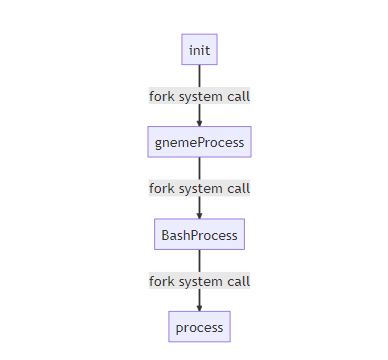

As we observe that when we run ps -l command, the parent id (PPID) of the ps process is 44 and 44 is the process id of bash (current shell). So we can conclude that every process is a clone of its parent process.
Mother Process
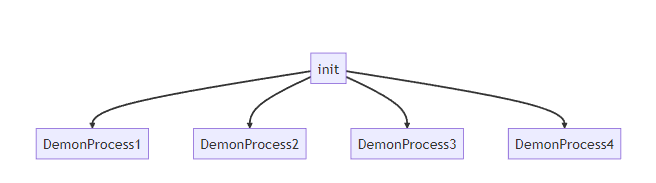
The mother Process is the first process initiated by the kernel when the system boots up which has a PID of 1. The mother process is also known as init and this process runs on root privileges.
Demon Process
Demon processes are the child processes of the mother. These are essential for the system running.
How processes terminates
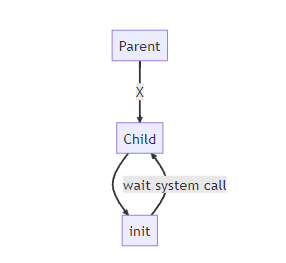
When the process completes, it calls its kernel by the exit system call with the argument exit code. The exit status code is used to indicate the reason for the process's termination, and it can be retrieved by the parent process using a wait system call. And the parent waits until free up the memory is used. For successful termination of the process, the termination status is 0.
Wait for system call provides a mechanism for managing the termination and collecting information about their execution.
#include <sys/wait.h>
pid_t wait(int *status); // Basic syntax of wait system call.
This is the basic syntax of the wait system call. As we can observe it is taking an exit status argument.
Orphan Process
If the parent process dies, then the child process of it is adopted to the mother(init) by the kernel for termination of the process. So, that mother can able to acknowledge the termination process by the wait system call. In this case, the child process is known as the orphan process.
Zombie Process
When the child process termination is not acknowledged by the parent, then the child process is treated as a zombie process by the kernel. Further, if the parent process acknowledges the zombie process termination then this is known as reaping. If reaping didn't occur then the wait system call is done by the mother to terminate the zombie process.
Signals
It is a notification to the process that something has happened.
| Signal | Description |
| SIGHUP/HUP/1 | HangUp |
| SIGINT/INT/2 | Interupt |
| SIGKILL/KILL/9 | Kill |
| SIGSEGV/SEGV/11 | Segmentation fault |
| SIGTER/TERM/15 | Terminate |
| SIGSTOP/STOP/19 | Stop |
Signal Mask
A signal mask is used to block signals but there are some signals like kill can't be blocked.
Nice & Renice
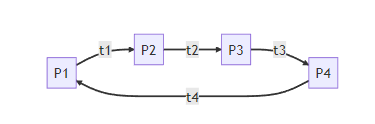
Processes aren't continuously run by the system. They are known in timeslots known as time slices in CPU and as cyclic as shown in the below example. So, the process will take the almost same time. But, we can prioritize the process by nice & renice commands. And every process has a nice which indicates priority value. If the nice value is less, the system will prioritize more or vice versa.
| Command | Description |
| nice -n priorityValue newProcess | for new process( ex: touch file.txt) |
| renice priorityValue -p processId | for already exit process |
States of processes
| State of processes | Description |
| R | The process is running |
| D | Interruptable sleep |
| S | Uninterruptable sleep |
| Z | Zombie |
| T | Stopped |
References
https://www.youtube.com/watch?v=cnbvsWKf-qM&list=PL2kSRH_DmWVZp_cu6MMPWkgYh7GZVFS6i&index=5
